


PDF to Excel Converter for Mac
- Free
- 4.2
- 1
- V10.2.4
Free Download for Mac
View an ad to download for free

- Flyingbee Software
- More programs (9)
Accurately extract data from PDF to Excel Spreadsheet
Offline PDF Converter, No Internet Required, 100% Process on your Mac, Privacy-safe.
Stop wasting hours retyping PDF data! PDF to Excel Converter for Mac is your ultimate solution. Instantly convert PDFs to Excel (.xlsx) or CSV files with pinpoint accuracy, making your workflow faster and easier than ever.
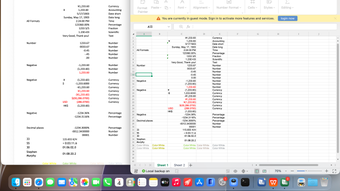
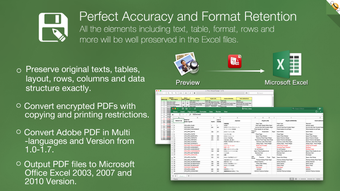
Flyingbee PDF to Excel Converter helps you spend less time retyping, low money, copying-and-pasting PDF data, as it quickly and accurately turns your native PDF files to editable Excel spreadsheet(.xlsx), retaining text fonts and table layouts. And you can easily edit, reuse and calculate the data in output excel(.xlsx) documents. No matter how complex the PDF file is, it can extract data from PDF to Excel spreadsheet correctly.
How to convert PDF to Excel on Mac?
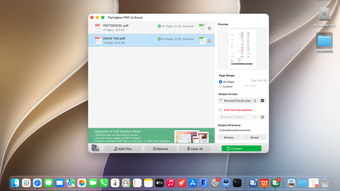
It takes only 3 steps to convert a PDF file to Excel document.
1. Add PDF files (Support drag and drop).
2. Select output formats and folder.
3. Click 'Convert' button and wait for the output file;
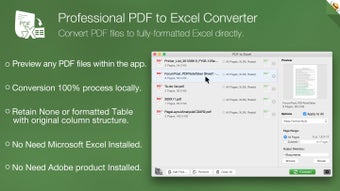
View PDF file right in the built-in PDF reader before conversion.
Main Features:
+ Conversion 100% process locally.
+ Convert PDF files to fully-formatted and editable Excel (.xlsx) documents in High Quality.
+ Export PDF to Excel spreadsheet(.xlsx .csv), and Elements (.jpeg .png) files too.
+ Add unlimited PDFs at one time.
+ Batch convert PDFs by one button.
+ Easily edit or reuse the PDF content.
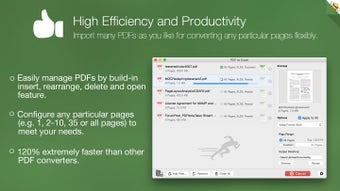
High efficiency and productivity
Import as many PDFs as you like for converting any particular pages flexibly.
• 3 Ways to add PDFs by browse, drag & drop, and open in.
• Configure any particular pages (e.g. 1,2-16,35 or all pages) to meet your needs.
• 100% fast speed to process PDF file locally.
Recently, it has added OCR AI text recognition. For scanned documents, please choose the ocr language that matches the document, as this can significantly improve recognition accuracy.
Loading…
App specs
Developer
- Flyingbee Software
- More programs (9)
License
Free
Version
10.2.4
Latest update
Platform
Mac
OS
macOS 10.15
Language
English
Available languages
- Spanish
- English
- French
- German
- Italian
- Portuguese
- Russian
- Chinese
- Korean
- Japanese
Downloads
1
Size
53.76 MB
Program available in other languages
PDF to Excel Converter for Mac
- Free
- 4.2
- 1
- V10.2.4
Free Download for Mac
View an ad to download for free
User reviews about PDF to Excel Converter
Have you tried PDF to Excel Converter? Be the first to leave your opinion!
Add reviewTop downloads Office Suites for Mac
Top downloads Office Suites for Mac

Microsoft Word
A free tool that empowers your productivity
Microsoft Excel
Structured spreadsheets for serious data work
Microsoft PowerPoint
Presentation control for clear slide narratives

Microsoft Office 2016
Download Microsoft Office for Mac: Word, PowerPoint, and more

Microsoft Office 2024
Download Microsoft Office 2024: Current, familiar, and essential
Top downloads Office Suites for Mac
Microsoft Word
A free tool that empowers your productivity
Microsoft Excel
Structured spreadsheets for serious data work
Microsoft PowerPoint
Presentation control for clear slide narratives
Microsoft Office 2016
Download Microsoft Office for Mac: Word, PowerPoint, and more

Microsoft 365
Download Microsoft 365 for Mac: Unlock the power of the cloud and Microsoft software
Related topics about PDF to Excel Converter
Latest articles

Setapp moves into AI: local and ready to use in Mac apps

iCloud Private Relay can leak your real IP through passkeys: Apple is investigating

MSI raises GPU prices again: GDDR6 and GDDR7 shortages deepen

Nintendo Switch 2 gets more specific release dates: price rises to $500
RAM prices could stay high through 2027: DRAM is already sold out
Laws concerning the use of this software vary from country to country. We do not encourage or condone the use of this program if it is in violation of these laws. Softonic may receive a referral fee if you click or buy any of the products featured here.